Customer-facing display
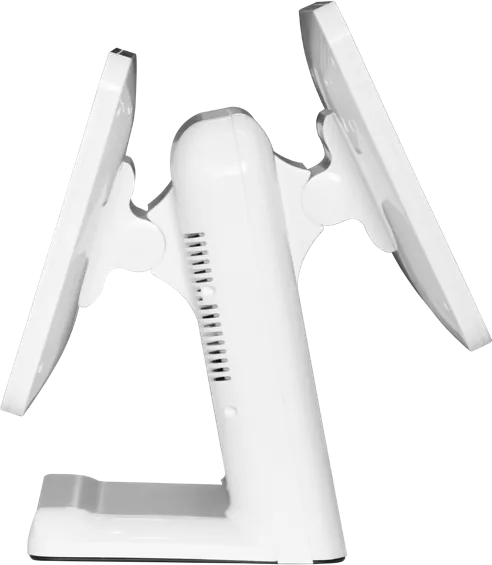
A customer-facing display is the second screen on a POS terminal that shows the shopper their items and total during checkout and plays promotions between orders. On our 15.6″ dual-screen POS it is the same size as the main screen or smaller, runs asynchronous content from the main system, and is backed by stereo 15 W + 15 W speakers.
Specifications
| Screen | Same size as the 15.6″ main screen or smaller |
|---|---|
| Mode | Dual-screen asynchronous display |
| Content | Order totals, promotions, ad images and video |
| Audio | Stereo 15 W + 15 W |
| Host | Android RK3288 or Windows Core i3-3217U |
| Housing | White or black |
Specifications are from the factory catalog and may change with configuration. Ask for the current spec sheet.
Key features
- Same-size or smaller second screen
- Shows order totals and promotions
- Stereo 15 W + 15 W speakers
- White or black housing
Typical installations
- Supermarket checkouts
- Quick-service restaurant counters
- Beauty and fashion stores
Commonly customized
- Customer screen size
- Touch or display-only
- Housing color
- Ad content management
Frequently asked questions
Does the customer display need its own computer?
No. It is driven by the POS main board, which outputs different content to each screen.
Can it show our promotions?
Yes. Between orders it plays poster images or video, and during checkout it shows the order total.
More POS & Dual-Screen Terminals
Quote: Customer-facing display
Send a size, a sketch or a reference model. You get a spec sheet and factory price from an engineer, usually within one working day.
To get an accurate quote, tell us
- Product type and screen size
- Quantity and target market
- What to customize — logo, color, peripherals, software
- Your timeline
- Reply from an engineer within one working day
- Spec sheet and factory price, not a sales script
- Drawings can be protected under NDA