RK3288 vs RK3399: which Android board to specify for signage and kiosks
Short answer: Specify RK3288 for devices that mainly play content or run one light app: signage, class boards, Android POS. Specify RK3399 when the device runs a camera, printer, scanner and card reader in the same transaction, or must decode 4K H.265 video. Choose Windows only when your software requires it.
- RK3288: quad-core Cortex-A17 at 1.8 GHz with a Mali-T764 GPU, enough for playback, class boards and Android POS.
- RK3399: hexa-core (2× A72 + 4× A53) at 2.0 GHz with Mali-T860 MP4 and H.265 4K decoding, for kiosks with several peripherals.
- Write RAM, storage, Android version, serial ports, camera interface and 4G into the board spec, not just the chip name.
- Windows on Intel Core is the right call only for existing PC software or Windows-only drivers.
The short answer
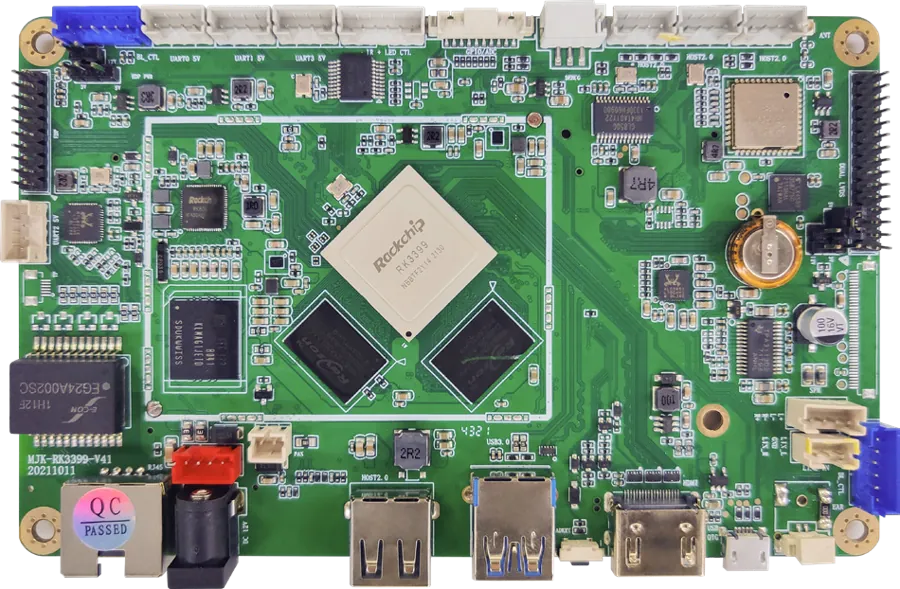
An Android mainboard is the computer inside a smart display. It runs the operating system, decodes video and talks to the touch screen and every peripheral. For most commercial displays the choice comes down to two Rockchip chips. Use RK3288 when the device mainly plays content or runs one light app. Use RK3399 when it drives several peripherals and a camera at the same time, decodes 4K H.265 video, or has to keep up with heavier apps over a long service life.
MJK has built Android boards on Rockchip since 2011, when it moved its display mainboards from DVD-based designs to Allwinner A20 and Rockchip RK3188/RK3288 platforms. The same boards run our own signage and kiosks and are sold separately to integrators through the Android boards and media players line.
Spec comparison from our data sheets
The table uses only figures from our board data sheets and from the catalog builds we ship. Where builds differ, the range is shown.
| Item | RK3288 | RK3399 |
|---|---|---|
| CPU | Quad-core Cortex-A17, 1.8 GHz | Hexa-core 64-bit, 2× Cortex-A72 + 4× Cortex-A53 (big.LITTLE), up to 2.0 GHz; 28 nm HKMG |
| GPU | Mali-T764 | Mali-T860 MP4; OpenGL ES 3.1, OpenCL, DX11 |
| RAM | 2 GB in catalog builds (DDR3 or DDR4 by build) | 2 GB standard, up to 4 GB; 4 GB in the 32″ payment kiosk |
| Storage | 8–16 GB in catalog builds; TF card | eMMC 8 GB standard, 16/32/64/128 GB options; TF card; 64 GB SSD in the payment kiosk |
| Network | Ethernet, dual-band Wi-Fi, Bluetooth; 4G and GPS optional | 10/100/1000 Ethernet, 2.4/5 GHz Wi-Fi 802.11ac, Bluetooth 4.1; 4G LTE optional |
| Video | Drives a 55″ 3840 × 2160 panel at 60 Hz over HDMI 2.0 (ceiling-hung display); 4K × 2K HDMI output on the class-board build | H.265, H.264, VP8 and more at 4K / 2K / 1080P |
| Android in our builds | 7.1 (signage, face terminal); 5.1 (ceiling-hung display) | 7.1 / 8.1, upgradable; 8.0 in the payment kiosk |
| Typical role | Playback, class boards, POS, single-purpose face terminals | Multi-peripheral kiosks, lockers, 4K content |
One point causes confusion. RK3288 is a quad-core Cortex-A17 chip with a Mali-T764 GPU. The hexa-core A72/A53 CPU and the Mali-T860 GPU belong to RK3399. If a combined spec sheet shows hexa-core figures under RK3288, ask the supplier to confirm the chip.
Where each board runs in our catalog
The clearest guide is what the boards already do in production.
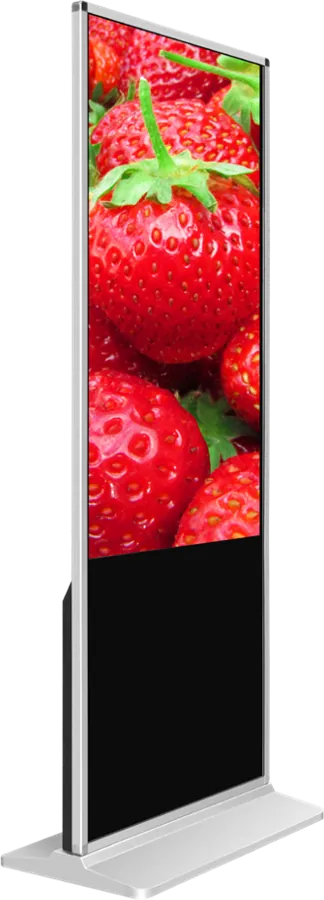
- RK3288 runs the 55″ indoor floor-standing signage (2 GB DDR4, 16 GB, Android 7.1), the 8″ face recognition terminal (2 GB DDR3, 16 GB eMMC, 0.34 s recognition), the 21.5″ digital class board (2 GB, 8 GB flash, three serial ports), the Android version of the 15.6″ dual-screen POS (2 GB + 16 GB) and the ceiling-hung double-sided display.
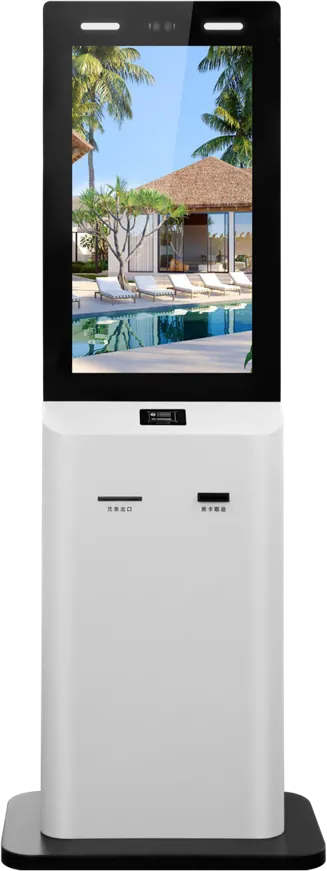
- RK3399 runs the 32″ payment kiosk (4 GB, 64 GB SSD, Android 8.0), where one board handles a thermal printer, 2D barcode engine, card reader/writer, 5 MP face camera and PIR sensor. It also runs the smart parcel locker (2 GB + 16 GB) with a binocular face camera, barcode module, A4 printer, surveillance camera and electronic locks.
- Either chip is offered on the bank and government terminal and the 4K network media player box.
The pattern is consistent. RK3288 sits in devices that show content and handle one input at a time. RK3399 sits in devices that coordinate a screen, a camera and three or four peripherals during one transaction.
When RK3288 is enough
- The main job is playback. Video, images and scrolling text from a publishing system, with split-screen layouts and schedules.
- Interaction is light. A touch menu, a web page or one app with one or two peripherals, such as a receipt printer on a POS.
- Face recognition is the only job. Our 8″ access terminal identifies a face in 0.34 s on RK3288 because nothing else competes for the CPU.
- The fleet is large. Class boards and bar displays are ordered in large numbers, so a lower board cost and lower power repeat on every unit.
When to step up to RK3399
- Several peripherals run in one transaction. Scan a code, read a card, capture a face and print a receipt: the payment kiosk pattern.
- The content is 4K. RK3399 decodes H.265 at 4K, 2K and 1080P. Specify it for 4K signage loops and high-bitrate video.
- Face recognition shares the board. A locker or kiosk that verifies a face while driving locks, a printer and the user interface needs the two Cortex-A72 cores.
- The app will grow. Up to 4 GB RAM, eMMC up to 128 GB and an upgradable Android 7.1/8.1 build leave room for later features.
What to put in the board specification
The chip name alone does not define a board. Before you order, write down:
- RAM and storage. 2 GB with 8–16 GB is typical for RK3288 playback devices. RK3399 offers 8–128 GB eMMC and up to 4 GB RAM. Add a TF card if content is stored locally.
- Android version. Check the minimum version your APK and your payment or ID SDKs support, then confirm it on the sample.
- Serial and USB ports. Count every peripheral. Our class-board build has three serial ports for 4G, NFC, printer, card reader, scanner and ID reader. Many printers and card readers still connect by serial.
- Camera interface. Our builds use MIPI cameras (2 MP or 5 MP on the class board) or USB cameras (up to 8 MP on the government terminal). Match it to your face SDK.
- Network. Name the 4G bands for your country if you need mobile data, and say whether GPS is required.
- Real-time clock. Needed for scheduled power on/off without a network connection.
- Firmware. Boot logo, launcher and kiosk lock-down. We supply firmware with your logo and launcher and can lay out the interface set to fit your housing.
When Windows is the better call
Choose an Intel PC module instead of either Rockchip board when:
- Your business already runs Windows software, such as a POS suite, a queue system or a hospital or government application, and porting it would cost more than the hardware saves.
- A required peripheral only has Windows drivers.
- Users need a full desktop browser or office software.
Our Windows builds use Intel Core i3/i5/i7 with 4 GB DDR3 and a 128 GB SSD on signage, a Core i3-3217U with 4 GB + 128 GB on the POS, and an industrial board with an Intel dual-core CPU on the queue ticket kiosk. The dual-screen service terminal and the interactive flat panels can carry Android and Windows together. Licence cost, power and lock-down are compared in our Android vs Windows guide.
Quick decision table
| Device | Recommended board | Reason |
|---|---|---|
| 1080P floor-standing or wall-mount signage | RK3288 | Playback, low power |
| 4K signage or high-bitrate video | RK3399 | H.265 4K decoding |
| Class board, campus attendance kiosk | RK3288 | Display plus card or face attendance |
| Single-purpose face access terminal | RK3288 | Recognition is the only task |
| Payment, ordering or check-in kiosk with several peripherals | RK3399 | Camera, printer, scanner and reader at once |
| Smart locker with face access | RK3399 | Face, locks, printer and UI together |
| Existing Windows application | Intel Core, Windows | Software compatibility |
Send us the device type, the peripheral list and your app, and we will confirm the board before quoting. Integrators buying boards only can start from the RK3399 mainboard page or ask about a custom layout through ODM.
Frequently asked questions
Can RK3288 handle face recognition?
Yes, on a single-purpose device. Our 8″ access terminal runs face recognition on RK3288 with a 0.34 s recognition time. When face recognition shares the board with printers, scanners and locks, specify RK3399.
Which Rockchip board supports 4K video?
RK3399 decodes H.265 and H.264 at 4K, 2K and 1080P and is the safer choice for 4K content. RK3288 can drive a 4K panel, as on our 55″ ceiling-hung display, but RK3399 is recommended for 4K H.265 video loops.
Can I buy the RK3288 or RK3399 board without a display?
Yes. Both boards are sold separately to integrators and manufacturers, with firmware carrying your boot logo and launcher, and the interface set can be laid out to fit your housing.