Face recognition access control and attendance terminals: a buying guide
Short answer: A face recognition terminal identifies a person at a door, turnstile or time clock, sends the open signal to the lock or gate, and records the passage as attendance. Choose it in this order: where it mounts, how it verifies a live face, what it connects to, and where the face data is kept. This guide uses the real specifications of our terminals so you can compare quotes on concrete numbers.
- Choose the form factor by where it mounts: turnstile or pole, door frame, wall for attendance, or a desk.
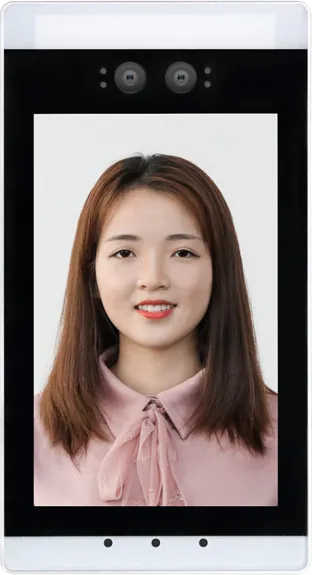
- Ask for a binocular camera with infrared liveness; ours identifies a face in 0.34 s and stores 11,000 faces on the device.
- Lock and gate signals, HR or visitor software and the card type decide a project more than the screen does.
- Decide where face data is stored, who can see it and how long it is kept before the first unit is installed.
1. What a face recognition terminal does
A face recognition terminal is a small Android or Linux computer with a camera and screen that matches a face against a stored library and then triggers an action: open a door, release a turnstile, or log a clock-in. It replaces or sits beside card readers and fingerprint clocks.
MJK, the factory behind DisplaySourcing, started making face recognition all-in-ones in 2019 for access control, attendance, security checks and smart passage, and added temperature-screening versions in 2020. The current range is on the face recognition terminal page.
Where they are installed
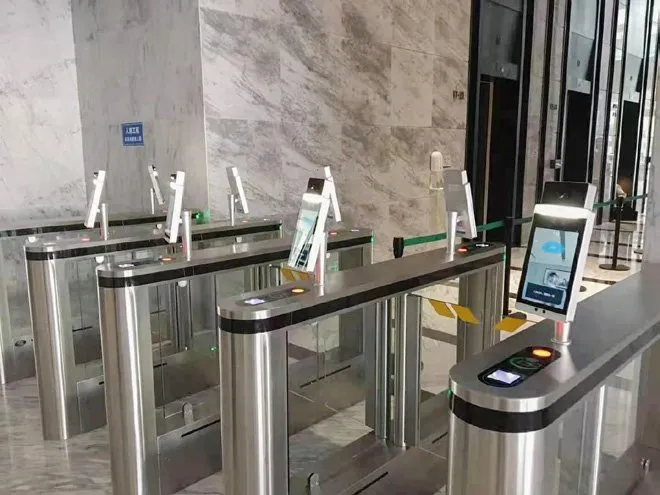
- Offices, factories and industrial parks: lobby speed gates, office doors and staff attendance. See offices and access control.
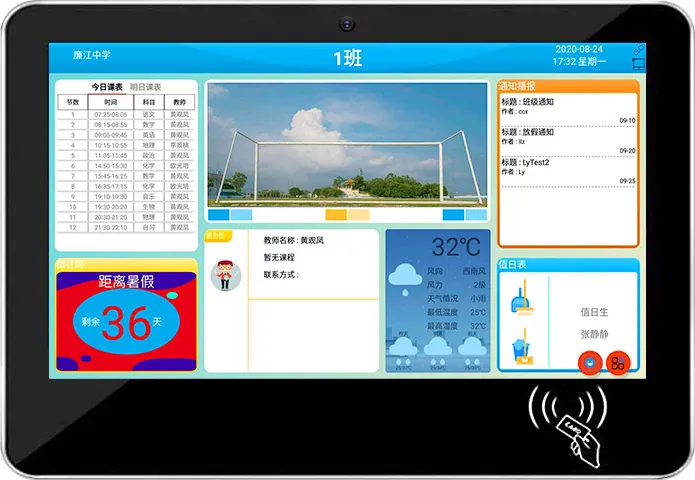
- Schools and campuses: gate attendance, dormitories, class boards. See education.
- Banks and government halls: staff areas and identity checks combined with ID cards. See banking and government.
- Residential communities and construction sites: entrance control and real-name worker check-in.
Photos of installed face terminals on office speed gates, turnstile lanes and campus entrances are on our projects page.
2. Choose the form factor by mounting position
Start with where the device goes; the form factor follows. The brochure shows five versions of the 8″ terminal alone: Android card version, Linux version, "digital sentinel" desktop version, digital sentinel standing scan version and standing scan version.
| Form factor | Mounts on | Typical use |
|---|---|---|
| Gate-mounted / pole | Turnstile bracket or a floor pole | Lobby speed gates, one terminal per lane |
| Pedestal with scanner | Floor stand at standing height | Entrances that also check QR passes |
| Wall-mount attendance | Wall near the staff entrance | Clock-in by face, card or fingerprint |
| Slim portrait panel | Door frame or turnstile post | Office, lab, meeting-room and dormitory doors |
| Desktop | Reception or security desk | Visitor check-in with staff present |
| 21.5″ standing kiosk | Floor, at a school gate | Student arrival and departure records |
One terminal per lane is the normal rule for gates. A single terminal shared between two lanes slows the queue and confuses users about which gate opened.
3. Camera, liveness and recognition performance
The camera decides whether the terminal can be fooled. Ask for a binocular camera with infrared liveness detection: one sensor captures the color image and the infrared channel checks that a real face, not a printed photo or a phone screen, is in front of it.
Our 8″ terminal specification from the brochure:
- 2 MP binocular wide-angle camera on a USB interface, infrared liveness detection
- Megvii face recognition algorithm, deep-learning based
- Recognition time 0.34 s, false-accept rate below 0.01%
- 11,000-face library stored on the device
Check the library size against your total headcount, including contractors, cleaners and regular visitors, not just employees. If you are close to 11,000, say so in the inquiry. The brochure does not state a recognition distance for the face function, so define the standing position at your gate and test it on the sample.
Face is rarely the only credential. Our terminals take IC/ID cards, QR codes, fingerprint and ID-card comparison as options, so visitors, new staff without an enrolled face, or people wearing protective equipment still have a way through.
Enrollment quality
Recognition is only as good as the enrolled photo. Enroll faces on the terminal itself or with front-facing, evenly lit photos without hats or heavy shadows. Re-enroll people whose appearance changes a lot, and test with a group that includes glasses, beards and different heights before signing off the sample.
4. Door locks and turnstile integration
The terminal makes the decision; the lock or gate does the physical work. Our terminals connect to door locks, speed gates and turnstiles, and the brochure lists the systems that can sit on the same gate: face, fingerprint, ID card, card, access attendance, QR code, temperature screening, campus systems and ticketing systems.
The brochure topology for a temperature-screening gate project puts terminals, gates and surveillance cameras on local switches, connected over the LAN to a management server, with a firewall and router to the internet. Plan the network the same way: wired Ethernet to every lane where you can.
For a campus pedestrian gate, the brochure lists these features:
- Opens by face recognition; accepts IC/ID magnetic cards and barcode cards
- External AI face and temperature terminal
- Arm drops automatically on power failure for emergency exit; control board keeps its settings
- Standard input and output interfaces, 24 V brushless motor with anti-collision mechanism
- Galvanized, painted cabinet; color and cartoon prints available
Our published spec sheets do not list the electrical output type (relay, Wiegand or a network protocol). Gate controllers differ by brand, so give us the gate or lock brand and the signal your controller expects, and we confirm the wiring and firmware before the quote is final.
5. Attendance and back-office software
Attendance is where most projects need software work. The brochure attendance terminal offers:
- Face, card or fingerprint clock-in, with the person's name shown on success
- ID-card comparison
- An attendance management software platform
- Offline attendance with automatic report generation
- Real-time video monitoring and voice intercom
Offline storage matters: if the network drops, people still get through and records sync later. Decide early whether you use our platform or connect the terminal to your own HR, payroll, visitor or school system. Firmware and protocols are customized per project; send the system name and its interface documents with the inquiry. If you plan to sell terminals under your own brand, read OEM vs ODM first.
6. Temperature-screening variants
A temperature-screening terminal adds an infrared sensor that reads forehead temperature during the face check. On our 8″ terminal the module is optional:
| Item | Value |
|---|---|
| Measuring distance | 20–60 cm |
| Measuring range | 10–42 °C |
| Accuracy | ≤ ±0.3 °C |
| Prompts | Mask and temperature reminder, voice read-out of the temperature, alarm sound on abnormal temperature |
Treat it as a screening aid, not a medical measurement. Leave it out if you do not need it: the standard terminal is simpler to install and the person can stand where the face camera works best.
7. Indoor vs outdoor installation, network and power
Our 8″ terminal is rated for −20 to 40 °C and 10–90% RH without condensation. Its screen is 250 cd/m², an indoor brightness level. The brochure gives no IP rating for the face terminals, so treat them as indoor or covered-entrance devices.
- Outdoor gates: install under a canopy, shield the camera from direct sun and rain, and tell us the site climate if it goes beyond the rated range.
- Backlight: glass lobbies facing the street put the face against bright daylight. Test the sample at the real door, at the time of day with the strongest light.
- Network: wired Ethernet, dual-band Wi-Fi and Bluetooth; a 4G module is optional and not standard. Power over Ethernet is not listed in the brochure, so plan a mains outlet.
- Power: AC 220 V, 50/60 Hz, 15 W maximum, through a Chinese national-standard plug; specify your country's plug and voltage in the order.
- Mounting height: set the camera at the face height of most users and keep the approach path straight, so people look at the screen while walking up. Schools with young children may need a lower bracket or a second terminal.
- Weight and storage: 1.95 kg without stand; 16 GB eMMC expandable by TF card or SSD.
8. Privacy and face data storage
A face template is biometric data, and many jurisdictions treat it as sensitive personal data. This section is general guidance, not legal advice; check the rules where you install.
- Consent and alternatives: under GDPR-style rules you usually need a clear legal basis and informed consent for biometric access. Offer a card or QR alternative for people who decline.
- Local or cloud storage: our terminals keep the library on the device, so recognition does not depend on a server. Decide whether the back office also stores face images centrally, and where that server sits.
- Retention: delete templates when someone leaves and keep attendance logs no longer than your policy requires.
- Access: restrict who can export the face library, and protect the admin menu with a password.
- Signage: post a notice at each entrance stating that face recognition is used and who to contact.
9. Compare the catalog models
| Model | Form / mounting | Verification | Key specs |
|---|---|---|---|
| 8″ face recognition terminal | Turnstile, pole, wall or desktop bracket | Face; card, QR, fingerprint options | RK3288, Android 7.1 or Linux, 2 MP binocular IR liveness, 0.34 s, 11,000 faces, temperature option |
| Attendance terminal with card reader | Wall-mount, horizontal screen | Face, card, fingerprint, ID comparison | Name display, offline attendance, auto reports, video monitoring, voice intercom, Android |
| Slim access control panel | Door frame, wall or turnstile, portrait | Face; card, fingerprint, ID comparison options | Management software platform, custom size, color and logo |
| Desktop face terminal | Desktop base | Face; QR, ID, temperature options | Binocular camera, voice prompts, links to gates and visitor systems |
| 21.5″ campus attendance kiosk | Floor-standing | Face, IC/ID card | 1920 × 1080 portrait, RK3288, infrared temperature probe, sheet-metal housing |
The 8″ terminal runs on RK3288 because face recognition is its only job; the RK3288 vs RK3399 article explains when a heavier board is needed.
10. Specification checklist for your RFQ
| Item | What to specify |
|---|---|
| Sites and lanes | Number of doors, gates and lanes; indoor, covered or outdoor |
| Form factor | Gate bracket, pole, wall, door frame or desktop |
| Headcount | Total faces to enroll, including contractors and visitors |
| Credentials | Face plus card type (IC, ID or both), QR, fingerprint, ID-card comparison |
| Lock and gate | Brand, model and the signal its controller expects |
| Software | Our platform or your HR, visitor or school system, with interface documents |
| Temperature | Module on or off |
| Network and power | Ethernet, Wi-Fi or 4G; plug type and voltage |
| Data | Where face data and logs are stored and for how long |
| Branding | Housing color, logo, boot screen, packaging |
Send the checklist through the contact page. The sourcing guide covers samples, inspection and payment terms.
11. Common mistakes
- Ordering terminals before confirming the gate controller and the open signal it accepts.
- Counting only employees when sizing the face library.
- Buying a camera without infrared liveness, which lets a photo open the door.
- Mounting the terminal against strong backlight, then blaming the algorithm.
- Assuming PoE and running only a network cable to the gate.
- No card or QR fallback for visitors and people who refuse face enrollment.
- No written rule for how long face data is kept and who can export it.
Frequently asked questions
How fast is a face recognition access control terminal?
Our 8″ terminal identifies a face in 0.34 seconds with a false-accept rate below 0.01%, using a 2 MP binocular camera with infrared liveness and an 11,000-face library on the device.
Can a face recognition terminal open our existing turnstiles?
Yes. The terminals connect to door locks, speed gates and turnstiles and mount on a gate bracket, pole, wall or desk. Give us the gate brand and the signal its controller expects, and we confirm wiring and firmware before quoting.
Does face attendance still work if the network goes down?
Yes. Faces are stored on the device and the attendance terminal supports offline attendance, then generates reports automatically once the records are collected.
Where is the face data stored?
The face library is kept on the terminal itself. Whether the back office also stores images centrally is your decision; set consent, retention and access rules under local law before rollout.