Live streaming machines for live commerce: a buying guide
Short answer: A live streaming machine is an all-in-one device that combines the camera, fill light, screen and streaming software a seller needs to go live. Choose it in this order: how the presenter works (seated or standing), what the camera has to show, which software features you will use, and what the room around it needs. This guide uses the stated specifications of our three catalog models so you can compare quotes on real numbers.
- A live streaming machine puts camera, light, screen and streaming apps in one Android 11 device, replacing a phone, ring light, tripod and laptop.
- Pick desktop for seated, close-up selling; standing 32″–55″ with 10× optical zoom for full-body and large products; the kit when you have no studio at all.
- The green screen, teleprompter and dual-camera features are in the director software; lighting, audio and upload speed still decide stream quality.
- For resale, specify logo, color, preinstalled apps and packaging, and test every platform account you sell for on a sample before the order.
1. What a live streaming machine is
A live streaming machine is an Android computer with a built-in or attached camera, a touch screen that shows the live view and comments, and director software for backgrounds, scripts and camera switching. The seller logs into the platform app on the device and goes live from one unit.
MJK, the factory behind DisplaySourcing, makes two machines and a complete studio kit. All three run Android 11 on a 6 nm MediaTek Dimensity 1200 with 8 GB DDR4 and 128 GB eMMC. The range is on the live streaming machine page.
What it replaces
Most small sellers start with a phone on a tripod, a ring light, and a laptop for scripts and order management. The all-in-one puts these parts into one device:
| Typical phone setup | All-in-one equivalent |
|---|---|
| Phone camera | 8 MP 3840 × 2160 camera (desktop) or 10× optical zoom camera (standing) |
| Ring light on a stand | Built-in three-color beauty light (desktop); fill lights in the kit |
| Tripod or phone clamp | Desk base or floor stand |
| Laptop or tablet for scripts | Teleprompter in the director software |
| Decorated studio wall | One-tap green-screen keying with image or video backgrounds |
| Second phone for a close-up | External close-up camera for dual-camera live |
The gain is less setup time per session and one device to manage per room. A phone is still lighter and cheaper; the machine makes sense when a team streams every day from fixed positions.
2. Who uses live streaming machines
The brochure shows the machines used for cosmetics, skincare, women's apparel, jewelry, shoes, warehouse, consumer electronics and furniture live selling. Beyond e-commerce, the catalog lists online teaching, brand showrooms and agencies running several rooms.
- Online shops and TikTok Shop sellers: daily product demos from a desk or a small room.
- Brand stores: in-store events streamed from the shop floor. See retail for the signage and kiosks that usually sit in the same store.
- Factories and trade-show booths: streaming products and production to remote buyers.
- Live commerce agencies: several identical rooms, often with their own brand on the hardware.
- Trainers and teachers: recorded or live lessons with documents on screen. If the main use is a classroom with students in the room, an interactive panel fits better; see the interactive flat panel guide.
3. Compare the catalog models
| Model | Screen | Camera | Light | Best for |
|---|---|---|---|---|
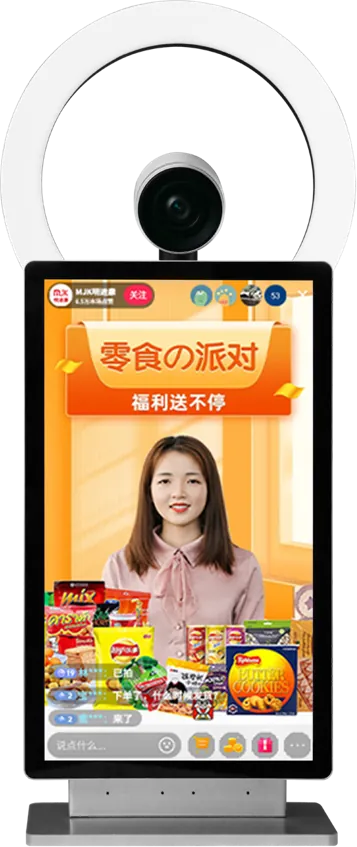
| 15.6″ desktop machine | 15.6″, 2K, fully laminated capacitive touch | 8 MP, 1/1.8″ sensor, 3840 × 2160; external close-up camera supported | Built-in three-color adjustable beauty light | Seated selling, close-up products, small rooms |
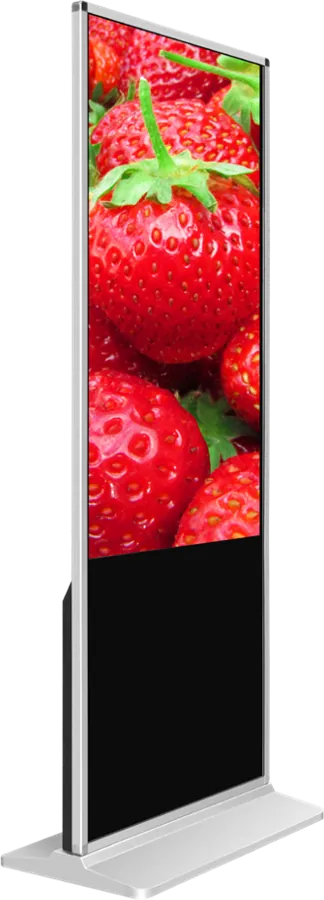
| Standing 32″ / 43″ / 55″ machine | 2K, 4K optional; infrared or capacitive touch | 1080P 60 fps; 2592 × 1944 effective pixels; 10× optical zoom; TOF focus; IR remote zoom | Not listed; plan studio lights | Full-body apparel and shoes, furniture, store floors |
| Flagship studio kit | Desktop or standing machine in the kit | Machine plus separate camera | Fill lights included | New teams with an empty room; sound card, microphone and green screen included |
All three share the same chip, memory, Android 11 and director software, so the choice is about screen size, camera reach and how much of the room you need to buy.
4. Specifications that matter, and what is not stated
Judge a live streaming machine on camera, light, screen and software first; the processor matters less once it can encode the stream and run the apps.
- Camera: the desktop camera has an 8 MP 1/1.8″ sensor at 3840 × 2160. The standing camera records and streams 1080P at 60 fps with a 10× optical zoom, a 67.5° distortion-free lens at F1.76–F3.0, and a focus range from 30 cm (wide) to 1.5 m (tele). The output resolution of a stream is also limited by the platform and your account, so check what each app actually sends.
- Light: the desktop's three-color light covers a face at desk distance. It does not light a whole room or a person standing two meters away.
- Screen: the presenter reads comments and the teleprompter on it, so size should match the reading distance: 15.6″ at a desk, 32″ to 55″ when standing back.
- Processor and OS: Dimensity 1200, 6 nm, 8 GB + 128 GB, Android 11 on every model.
The brochure does not state a battery, a built-in microphone, speaker power, network interfaces or an ingress rating. Treat the machines as mains-powered indoor devices, plan an external microphone (the kit includes one with a sound card), and ask us to confirm Wi-Fi and Ethernet for your configuration in the quote.
5. Desktop vs standing vs green-screen kit
Match the model to how the presenter moves and what the camera has to frame.
| If you... | Choose | Why |
|---|---|---|
| Sit at a desk and show small items: cosmetics, skincare, jewelry, phone accessories | 15.6″ desktop | Built-in beauty light and a close-up camera option; fits on a table |
| Stand, turn around, try on clothes or shoes | Standing 43″ or 55″ | 10× optical zoom moves from full body to product detail by IR remote without moving the stand |
| Sell large items: furniture, appliances, warehouse stock | Standing | Focus reaches 1.5 m in tele; the large screen stays readable from further back |
| Have an empty room and no equipment | Flagship studio kit | Machine, camera, fill lights, sound card, microphone and green screen arrive together |
| Run several rooms for clients | One model per room type, standardized | Same software and spare parts across rooms; staff move between rooms without retraining |
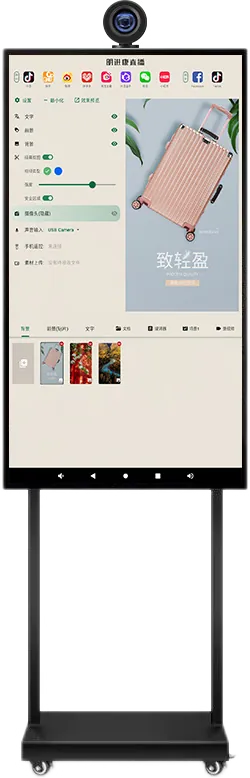
The standing machine sits on a wheeled floor stand, so it can move between a studio and a shop floor. The desktop model suits rooms where one person streams seated for hours.
6. Director software and platform apps
MJK director software runs on the machine and does the jobs a laptop and a production switcher would otherwise do. From the brochure:
- Teleprompter: auto scroll and pause, adjustable speed, font, size and color.
- Green-screen keying: one tap replaces the green backdrop with an image or video background; strength and keying color are adjustable.
- Dual camera: shows two camera views in the live picture, each can be shown or hidden; picture-in-picture is available.
- Overlays: foreground stickers, text and documents in Word, Excel, PPT and PDF format, saved as switchable scenes.
- Recording: records and saves video while streaming.
- Phone remote: scan a code to download the remote app and switch backgrounds from a phone.
The software's platform switcher in the brochure shows TikTok and Facebook as overseas platforms, and Douyin, Kuaishou, Taobao, Pinduoduo, WeChat, Xiaohongshu, Weibo, JD and Alibaba 1688 as domestic ones. For any other service, install the apps you use from Android and confirm compatibility on a sample. Live-selling permissions such as TikTok Shop LIVE depend on your account and region, not on the hardware, so check them with the platform first.
A live machine is not a signage player. If you want shop screens to replay recorded live clips and promotions, manage those through a signage system; the digital signage CMS guide explains how.
7. Studio setup basics: light, background, audio, network
The machine removes most of the gear, but the room still decides how the stream looks and sounds. This is general guidance.
- Lighting: put the main light in front of the presenter, slightly above eye level. Avoid a window behind them. For a green screen, light the screen evenly and separately from the presenter, so there are no shadows or hot spots.
- Background: keep the presenter at least one to two meters in front of the green screen to reduce green spill on hair and shoulders. Iron or stretch the screen; wrinkles make uneven keying.
- Audio: viewers forgive soft video before bad sound. Use a close microphone through a sound card, as in the kit, choose it as the audio input in the software, and add curtains or soft furnishings to cut echo.
- Network: test the upload speed at the streaming position, not at the router. A 1080P stream needs a steady upload of several Mbit/s with headroom; use a cable wherever your configuration has Ethernet.
- Power: plan outlets for the machine, lights and sound card, and keep cables off the presenter's walking path.
8. OEM options for distributors and agencies
Distributors and live commerce agencies can sell the machines under their own brand. The catalog lists these custom options:
- Branding: logo on the bezel, boot screen and box.
- Hardware: screen size, 2K or 4K panel on the standing model, stand style and color, camera and lens configuration, a close-up camera kit.
- Software: your streaming app and background library preinstalled.
- Kit contents: desktop or standing machine in the kit, light and microphone set, branded packaging.
Preinstalled apps need a version plan: platform apps update often, so agree who updates them after delivery. Read OEM vs ODM to decide how much you change, and see OEM service and our factory for how branded orders are built.
9. Specification checklist for your RFQ
| Item | What to specify |
|---|---|
| Model | 15.6″ desktop, standing 32″ / 43″ / 55″, or flagship kit |
| Quantity | Units per room type and number of rooms |
| Products sold | Small items or full-body and large products; this decides the camera |
| Display | 2K or 4K (standing); infrared or capacitive touch |
| Cameras | Built-in only or add a close-up camera for dual-camera live |
| Kit items | Fill lights, sound card, microphone, green screen |
| Platforms | Every app and region you stream to, for sample testing |
| Software | Apps and backgrounds to preinstall; interface language |
| Network and power | Wi-Fi or Ethernet; plug type and voltage for your country |
| Branding | Logo, boot screen, stand color, packaging and manual language |
Send the checklist through the contact page. The sourcing guide covers samples, inspection and payment terms.
10. Common mistakes
- Buying the desktop model for apparel, then finding the camera cannot frame a standing presenter.
- Selling green products or wearing green in front of a green screen, so they disappear in the key.
- Relying on a built-in microphone instead of planning an external one.
- Testing on office Wi-Fi at night and going live on a crowded network at peak hours.
- Assuming the hardware grants TikTok Shop or other live-selling permissions.
- Preinstalling platform apps for resale with no plan for updates.
- Skipping a sample test with every platform account the buyer will use.
Frequently asked questions
Can I use a live streaming machine for TikTok Shop?
The machines run Android 11 and the director software lists TikTok among overseas platforms. Live-selling permissions depend on your account and region, so confirm them with TikTok and test your account on a sample.
What is the difference between the desktop and standing models?
The desktop is a 15.6″ 2K touch unit with an 8 MP 3840 × 2160 camera and built-in beauty light for seated selling. The standing model is 32″, 43″ or 55″ with a 10× optical zoom camera at 1080P 60 fps for full-body and large products.
What comes in the green screen live streaming kit?
A live streaming machine, a camera, fill lights, a sound card, a microphone and a green screen. You add a network connection and your platform account.
Can you put our brand and apps on the machines?
Yes. OEM options include your logo on the bezel, boot screen and box, stand style and color, screen size, preinstalled streaming apps and backgrounds, and branded kit packaging.