Custom Android mainboards for kiosks, digital signage and POS: an ODM guide
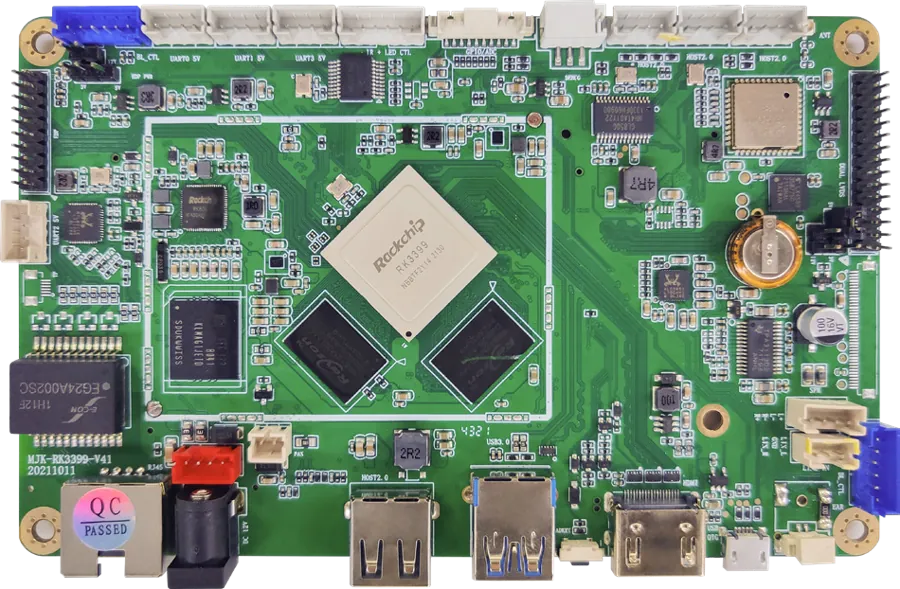
Short answer: The mainboard is the computer inside a kiosk, a signage screen or a POS terminal. It decides which printers, scanners and cameras can connect, which video plays smoothly, and how the device boots, updates and recovers. MJK started in 2005 as a display mainboard designer, and the RK3288 and RK3399 boards in our catalog run inside our own signage, kiosks, POS terminals and face terminals. This guide explains what can be customized, in what order, and what to agree before a board goes into your product line.
- The mainboard decides what a kiosk or signage product can connect, play and run; customizing it is the deepest ODM change.
- Our standard boards are Rockchip RK3288 (quad-core A17, Mali-T764) and RK3399 (2× A72 + 4× A53, Mali-T860 MP4, H.265 4K decode).
- Most projects change four things: the interface layout, memory and storage, the drivers for printers, scanners and readers, and the firmware with your launcher.
- Lock the peripheral list, firmware behavior and long-term supply terms in writing before the board is laid out.
1. Why the mainboard matters in an ODM product
In a kiosk or signage product, the screen and the cabinet are what buyers see, but the mainboard is where most field problems start: a printer that is not recognized, a video that stutters, a device that never comes back after a power cut, or an update that cannot be pushed. A board designed for your product removes adapters and USB hubs, keeps cables short, and puts the right ports where the cabinet needs them.
The OEM vs ODM guide explains the layers of customization; the mainboard is the deepest one, because it changes hardware, drivers and firmware together.
2. RK3288 or RK3399: the two standard platforms
| Item | RK3288 board | RK3399 board |
|---|---|---|
| CPU | Quad-core Cortex-A17, 1.8 GHz | Hexa-core 64-bit: 2× Cortex-A72 + 4× Cortex-A53, up to 2.0 GHz |
| GPU | Mali-T764 | Mali-T860 MP4; OpenGL ES 3.1, OpenCL |
| Memory / storage | DDR3 2 GB (up to 4 GB); eMMC 8 GB, 16–128 GB optional; TF / SSD | DDR3 2 GB (up to 4 GB); eMMC 8 GB, 16–128 GB optional; TF / SSD |
| Video | Up to 4K output | H.265 / H.264 and more; 4K, 2K, 1080P decode |
| Network | Gigabit Ethernet, dual-band Wi-Fi 802.11ac, Bluetooth, 4G optional | Gigabit Ethernet, dual-band Wi-Fi 802.11ac, Bluetooth up to 4.1, 4G LTE optional |
| Android | 7.1 in our signage builds | 7.1 / 8.1, upgradable |
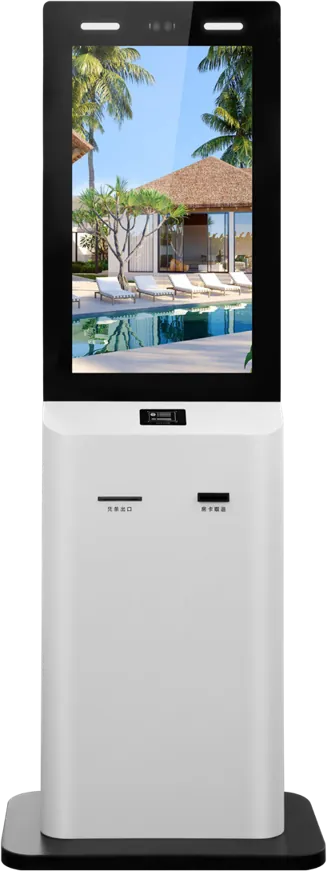
| Inside our products | Indoor signage, dual-screen POS, class boards, 8″ face terminals | Kiosks, face-recognition terminals, 4K signage, the 32″ payment kiosk |
Choose RK3288 for playback devices and simple interactive terminals where cost matters; choose RK3399 for kiosks with several peripherals, face recognition or 4K H.265 content. The RK3288 vs RK3399 article compares them in depth, and the 4K media player box packages the same platforms in an aluminium case for existing screens.
3. Interfaces and peripherals
Start the design from the device list, not from the board. Write down every device the product must connect and how:
| Device | Typical connection | What to confirm |
|---|---|---|
| Touch screen | USB or I²C | Touch controller model and driver |
| Receipt or ticket printer | Serial (RS-232) or USB | Printer model, paper width, driver or command set |
| QR / barcode scanner | USB or serial | Keyboard mode or serial protocol |
| Card reader, ID reader | Serial or USB | Card standard, SDK for Android |
| Camera | USB or MIPI | Resolution, face algorithm, IR or binocular |
| Second display | LVDS, eDP or HDMI | Panel timing and size; same or different content |
| 4G, GPS, IR remote | Module on board | Bands for your country, antenna position |
| Speakers, microphone | Amplifier on board | Power per channel, echo cancellation for calls |
Our RK3288 board lists camera, touch, GPS, 4G and IR peripherals and serial ports for printers and readers; the RK3399 board lists camera, touch screen, GPS and IR modules. Connections are typical, not universal; each module is confirmed per project. The kiosk peripherals article explains the modules themselves.
4. Board layout and the cabinet
A custom layout puts each connector on the edge that faces the device it serves, so cables are short and the cabinet can be smaller. Agree these points with the enclosure design:
- Board size and mounting holes, so it fits the cabinet bracket or the back of the panel.
- Connector positions and types, including locking connectors where vibration or service access could loosen a cable.
- Heat: the RK3399 runs warmer under load; plan a heat sink and airflow. Our media player box uses an all-aluminium fanless body as its heat sink.
- Power input and protection, including what happens on brownouts.
- Service access: a technician must reach the board, the TF slot and the debug port without removing the screen.
The enclosure guide covers the cabinet side of the same decisions.
5. Firmware: launcher, kiosk mode and updates
Most of what users notice about a device comes from the firmware, not the hardware:
- Boot logo and launcher: your logo from power-on, and your app as the home screen. Our board options list firmware with your launcher and boot logo.
- Kiosk mode: the app starts automatically, cannot be closed, and the status bar, settings and other apps are hidden.
- Recovery: after a crash or power cut, the device restarts the app on its own; a watchdog restarts a frozen system.
- Scheduled power on/off: an RTC battery keeps time so the device can switch off at night and on in the morning. Our bank and government terminal lists RTC, scheduled on/off, OTA updates and remote monitoring.
- OTA updates: firmware and app updates pushed over the network, with a safe fallback if an update fails.
- Language and region: system language, time zone and Wi-Fi region set for the target market. The RK3399 board's Android build is multilingual.
Agree in writing who builds and signs the firmware, how updates are delivered, and who keeps the source and keys.
6. Samples, testing and production
A board project usually runs in this order: requirement list, schematic and layout, a small batch of sample boards, firmware bring-up with your app and peripherals, a pilot run in complete devices, then mass production. Check these at the sample stage:
- Every peripheral works with your app, after a cold start and after a reboot.
- Video plays your real content, at the resolution and bitrate you will use, for many hours.
- The device recovers by itself after power is cut during playback and during an update.
- Network failover from Ethernet to Wi-Fi or 4G works if you rely on it.
- Temperature inside the closed cabinet stays within limits at full load.
Our production process page describes burn-in and inspection, and the sourcing guide covers sample approval and inspection before shipment.
7. Long-term supply and change control
A board inside your product line must stay the same for years, or change only with your approval. Agree:
- Long-term supply for the product line, which our board options list, and how much notice you get before a component reaches end of life.
- Change control: no change to memory chips, storage or Wi-Fi module without notice and a new sample, because these changes can affect drivers and certification.
- Firmware versions: each shipment carries a known firmware version, recorded in the inspection report.
- Spare boards for service, and how repaired boards are handled.
Certification for the finished device, such as CE or FCC, is tested on the complete product; a board change can mean retesting. See the certification guide.
8. Specification checklist for a board project
| Item | What to specify |
|---|---|
| Product | Kiosk, signage, POS or other; expected yearly volume |
| Platform | RK3288 or RK3399, or advice based on your content and peripherals |
| Memory and storage | RAM and eMMC size; TF or SSD |
| Displays | Main and second panel: size, resolution, interface |
| Peripherals | Full device list with models and connections |
| Network | Ethernet, Wi-Fi, Bluetooth, 4G bands |
| Firmware | Android version, launcher, boot logo, kiosk mode, on/off schedule, OTA |
| Mechanical | Board size, connector positions, mounting, heat |
| Supply | Supply period, change notice, spares |
Send it through the contact page, or start from our Android board and player range. For complete devices built on these boards, see the payment kiosk guide and the digital signage CMS guide.
9. Common mistakes
- Choosing the board before listing the peripherals, then adding USB hubs and adapters inside the cabinet.
- Testing samples with demo content instead of the real videos and app.
- No recovery after power loss, so devices in the field stay on a black screen.
- No OTA plan, so every update needs a visit.
- Accepting a silent change of memory or Wi-Fi chip in a later batch.
- Choosing the cheapest platform for 4K H.265 content it cannot decode smoothly.
Frequently asked questions
Can you customize the Android mainboard for our kiosk?
Yes. We design boards on the Rockchip RK3288 and RK3399 platforms and can change the interface layout, memory and storage, peripheral drivers and the firmware with your launcher and boot logo. MJK started in 2005 as a display mainboard designer.
Should we choose RK3288 or RK3399?
RK3288 suits playback devices and simple interactive terminals where cost matters. RK3399 suits kiosks with several peripherals, face recognition or 4K H.265 content, thanks to its six-core CPU and Mali-T860 MP4 GPU.
Can the board run our app in kiosk mode with remote updates?
Yes. The firmware can start your app at boot, hide the system UI, restart after a crash or power cut, switch on and off on a schedule and take OTA updates. These behaviors are agreed in writing and tested on samples.
Do you offer long-term supply for a board?
Long-term supply for a product line is one of our board options. Agree the supply period, notice before end-of-life parts and change control for memory, storage and Wi-Fi chips in the contract.